Facebook's Hidden Gem: How the Favorites Feed Transforms Your Social Media Experience
- February 4, 2024
- Social Media, Technology, Productivity, Tips
I almost deleted Facebook a couple of years ago. My feed had become a mess - random sponsored posts, distant cousins arguing about politics, people I went to high school with pitching essential oils, and somehow almost nothing from the friends I actually wanted to keep up with.
Then I stumbled onto a setting Facebook built but doesn’t really advertise: the Favorites feed. It’s not a hack, not a third-party app, just a built-in feature most people don’t know exists. It’s the only reason I still open the app.
What the Favorites feed actually is
It’s a separate feed inside Facebook that only shows posts from people, pages, and groups you’ve manually marked as favorites. The algorithm doesn’t decide. You do.
Think of it as a smaller, hand-picked version of your timeline. Your mom’s photos from her trip - yes. The local news page you actually read - yes. Group chats and ads from someone you barely remember adding in 2011 - gone.
Why I keep coming back to it
A few things changed once I started using it:
I spend less time on Facebook, and like it more. The Favorites feed is finite. I can scroll through everything in five or ten minutes and be done. No infinite hole.
I stopped missing things from people I care about. Important life updates from close friends weren’t getting buried under noise anymore.
The algorithm doesn’t get to play games with me. That weird “people you may know” rabbit hole, the suddenly-political-post-from-someone-you-barely-know thing - none of it shows up here.
My phone time went down. I check it, I close it. The dopamine slot machine just isn’t built into this feed.
How to set it up
Facebook tucks this thing away pretty deep. Here’s where it actually lives.
On your phone:
- Open the Facebook app.
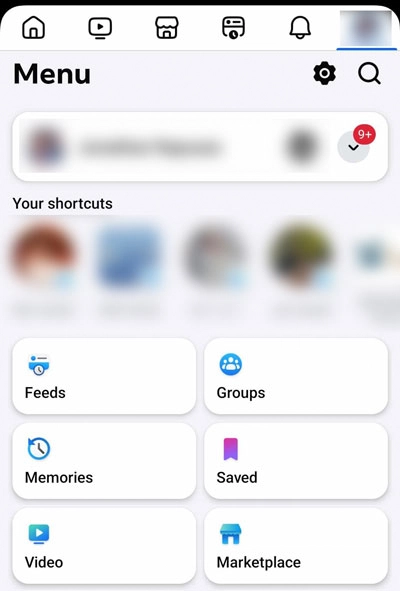
- Tap the menu (three lines, usually bottom-right on iOS, top-right on Android).
- Scroll down until you see Feeds. It’s not at the top, you have to look for it.
- Tap Favorites.
On a computer:
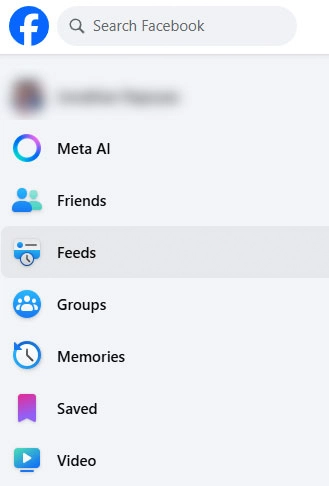
- Look in the left sidebar of the home page for Feeds.
- Click Favorites.
If you can’t find “Feeds,” the sidebar may have collapsed it. Expand the sidebar, or scroll the menu - Facebook moves things around occasionally.
Adding people, pages, and groups
This is the fun part: deciding who gets in.
- Friends: open their profile → tap Friends → choose Add to Favorites.
- Pages: open the page → tap Following (or “Liked”) → choose Favorites.
- Groups: open the group → tap Joined → Add to Favorites.
A few things I learned by overdoing it first
Start small. I added something like fifty people my first day. Too many. The whole point disappears if your favorites feed becomes just as cluttered as the main one. Fifteen to twenty is a great starting point.
Be honest about who matters right now. Close family, your three or four real friends, maybe a local news page or a hobby group you actually engage with. That’s usually it.
It’s private. Nobody gets a notification. Nobody can see your list. You can add and remove people freely and they’ll never know.
The cap is 30. That covers friends, pages, and groups combined. Honestly, you’ll have a hard time even filling that.
A few questions I had
Does this replace the regular feed? No. Your normal home feed stays the same. The Favorites feed is just another tab.
Will my favorited friends know? No. There’s no notification or any visible signal.
Does it affect what shows up in my regular feed? Not really. Posts from favorites might show up there a bit more often, but the main feed isn’t fundamentally changed.
Give it five minutes
Facebook gets a lot wrong, but this one feature is genuinely good - it just doesn’t get the spotlight it should. It takes about five minutes to set up. Start with the obvious people in your life, see how it feels for a week, and adjust from there.
If it doesn’t click for you, no harm done. But if you’re anything like me, you’ll wonder why you didn’t find it sooner.
Share